
Knowledge base
The knowledge base is how an agent answers questions about your business — your prices, your policies, your opening hours — instead of guessing or falling back on general knowledge.
How it works
Upload a document and it's automatically chunked, embedded and indexed:
Upload file
  → split into chunks
  → embed each chunk
  → index for search
Then, during a call, when the agent needs a fact it doesn't have, it searches — as a tool call, mid-conversation — and answers from what comes back.
The knowledge base is not in the prompt
This is the part that surprises people. Your documents aren't loaded into the agent's instructions. The agent decides to search, waits for results, then answers.
That's what lets a knowledge base be large without slowing every turn — only the turns that actually search pay the cost.
What belongs here
| Goes in the knowledge base | Goes in the prompt |
|---|---|
| Price lists | Who the agent is |
| Opening hours, locations | What it does and refuses to do |
| Policies, terms, warranty details | How it should speak |
| Product specifications | When to search the knowledge base |
| FAQs | Rules that apply to every call |
The rule: facts go in the knowledge base, behaviour goes in the prompt.
Putting facts in the prompt is expensive on every turn and goes stale silently. Putting behaviour in the knowledge base doesn't work at all — the agent only reads it when it happens to search.
Uploading
Path A — from the agent
- Open the dashboard.
- Left sidebar → Configure → Agents.
- Open the agent that should answer from these documents.
- Top tab row → Knowledge Base.
- Upload your file(s).
Path B — from the workspace library
- Left sidebar → Configure → Knowledge Base.
- Choose the agent the document belongs to (knowledge is per agent, not shared automatically across the workspace).
- Upload.
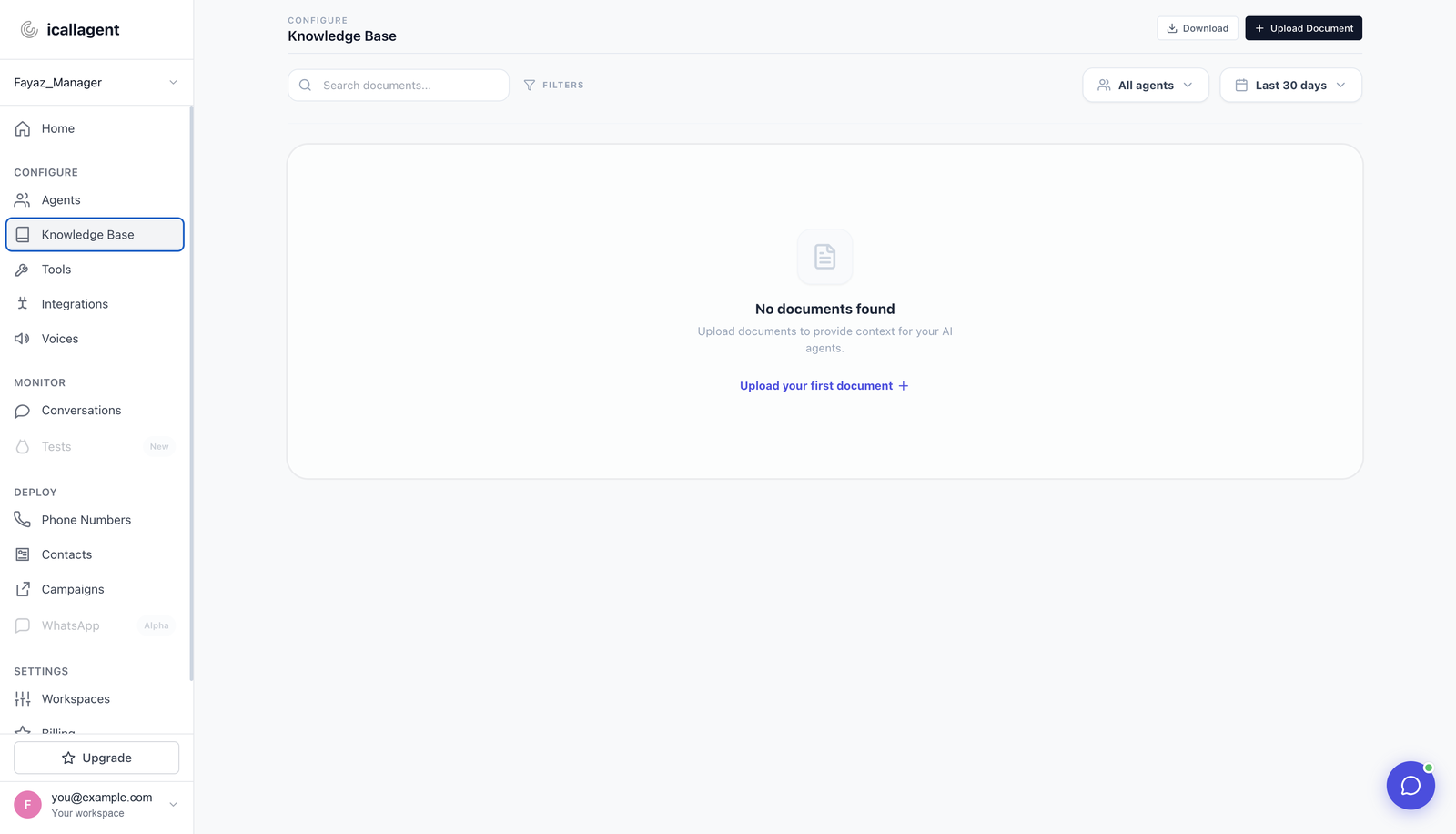
Extraction runs in the background. A freshly uploaded file takes a moment before the agent can find it — if you test immediately after uploading and the agent says it doesn't know, wait and try again.
Then: Agents → that agent → Test → Start test call, and ask a question that only the document can answer.
Writing documents an agent can actually use
The agent retrieves chunks, not whole documents. It sees a few relevant fragments, not the file. That changes what "good documentation" means.
Make each section self-contained. A chunk that says "this option costs £40 extra" is useless without knowing what "this option" is. Repeat the subject.
Emergency call-outs

These are available 24/7. They cost £120 for the first hour.
Outside the M25 there's an additional charge.Emergency call-out pricing
Emergency call-outs are available 24 hours a day, 7 days a week.
An emergency call-out costs £120 for the first hour.
Emergency call-outs outside the M25 cost an additional £45.The second version survives being cut into pieces. Every sentence still makes sense alone.
Other things that help:
- Use the words your callers use. Search matches meaning, but a document written in internal jargon still retrieves worse for a caller asking in plain language. If customers say "emergency plumber" and your document says "priority dispatch service", add both.
- Answer questions explicitly. A heading of "Can I cancel a booking?" followed by the answer retrieves better than a policy paragraph that implies it.
- Keep one topic per section. Mixed sections produce chunks that are half-relevant to everything and fully relevant to nothing.
- Prefer many short documents over one long one. Easier to update, easier to retrieve.
Telling the agent to use it
Uploading isn't enough — the agent needs to know when to search, and what to do when it finds nothing:
When the caller asks about prices, opening hours, service areas or
policy, search the knowledge base before answering.

If the knowledge base doesn't have the answer, say plainly that you
don't have that information and offer to take a message. Never guess
at prices or policy.
That second paragraph is the important one — see It guesses instead of admitting a gap. Without it, an agent that can't find something will often produce a plausible answer instead of admitting the gap — and a confidently wrong price is much worse than "let me have someone call you back".
When the agent can't find something
Work through these in order:
- Did extraction finish? Freshly uploaded documents aren't instantly searchable.
- Is it attached to the right agent? A document on a different agent in the same workspace isn't visible to this one.
- Does the document use the caller's words? Try searching the phrase the caller used.
- Is the answer split across chunks? A fact that needs two distant sections to make sense often retrieves only half. Restate it in one place.
- Is it actually in there? Read the document. This is more often the answer than it should be.
The transcript under Monitor → Conversations (open the call) shows whether the agent searched and what came back — check that before changing documents.
Managing documents over the API
Document management is available on the dashboard API, per agent:
GET    /api/agents/{id}/knowledge-base/          list documents
POST   /api/agents/{id}/knowledge-base/          upload (multipart/form-data)
DELETE /api/agents/{id}/knowledge-base/{doc_id}/ delete
TIP
These are on the internal dashboard API (session/JWT auth), not the public partner API. If you're building a third-party integration, see API reference for what's available over OAuth2.
Next
- Tools — the knowledge base is one; there are others
- Writing the system prompt — telling the agent when to search
- Testing your agent